SoloIP

Network isolation for game studios, cross-border e-commerce, and multi-account operations

View firmware downloads
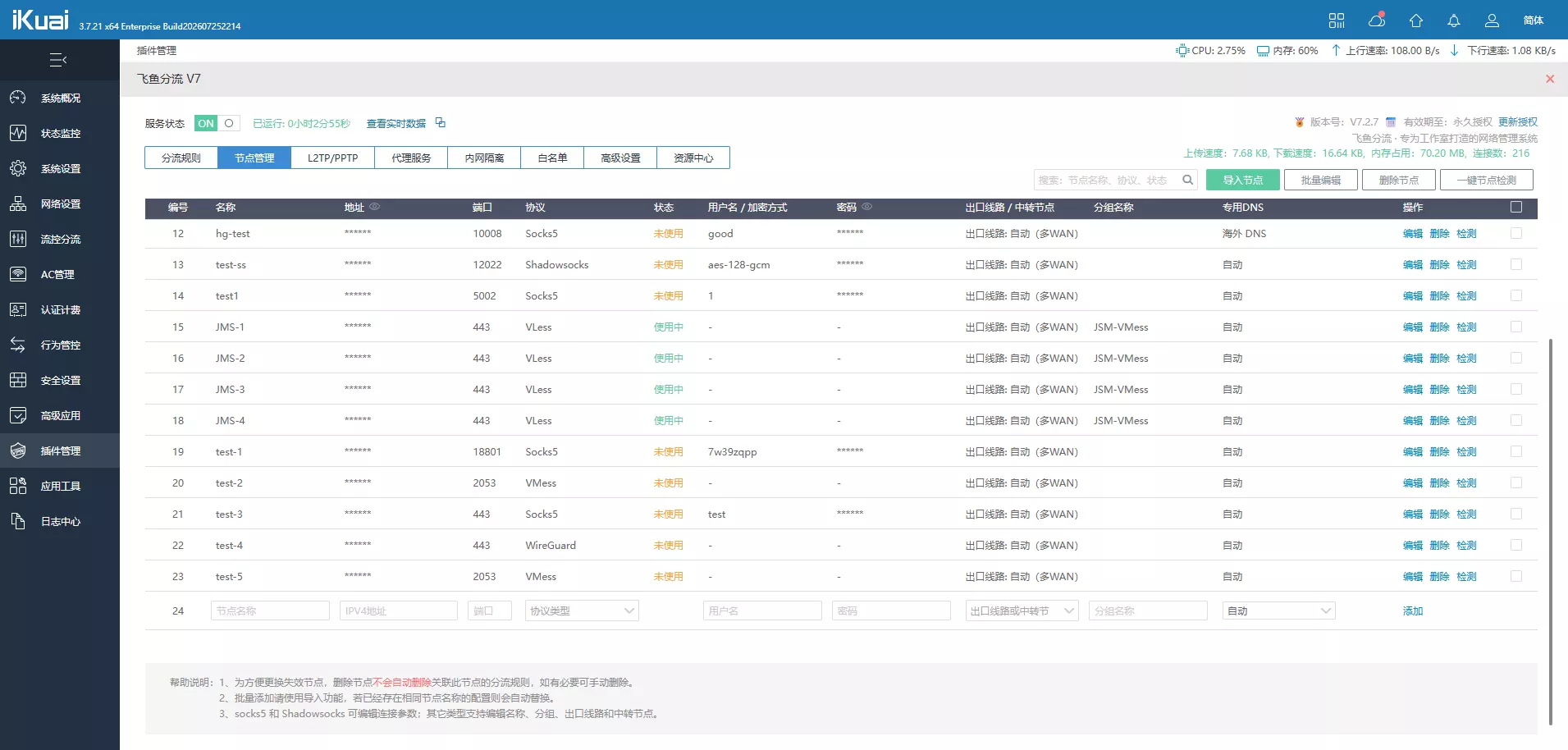
SoloIP V7 node management interface in iKuai

Why SoloIP

Connecting devices to different nodes is only the beginning. SoloIP focuses on efficient operations, consistent network identities, and reliable control as your business grows.

Change one setting without restarting every operation

Add nodes, adjust rules, or change individual settings with minimal disruption. Other online devices keep running while you maintain the system.

  • Bulk import and edit nodes and routing rules
  • Hot-reload individual settings to reduce downtime
  • See service status, live traffic, and node diagnostics at a glance
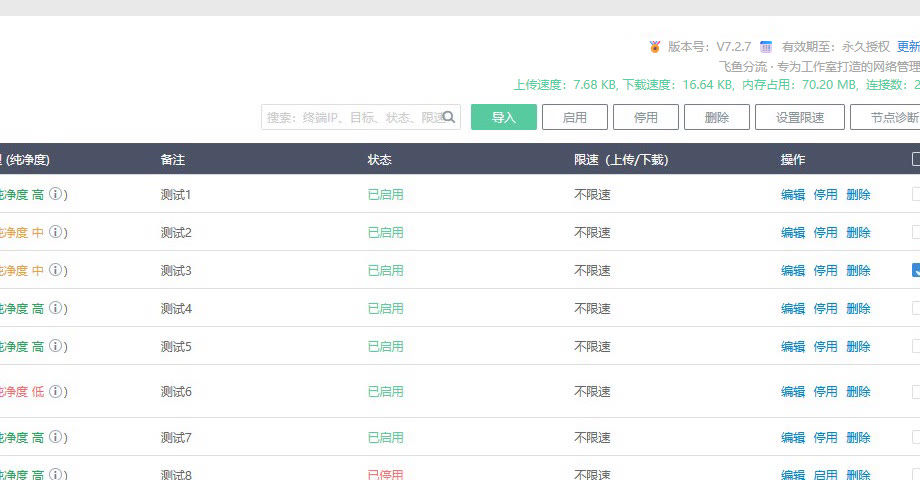
SoloIP V7 routing rules import, toggle, and inline actions

Protect each device identity from data to link

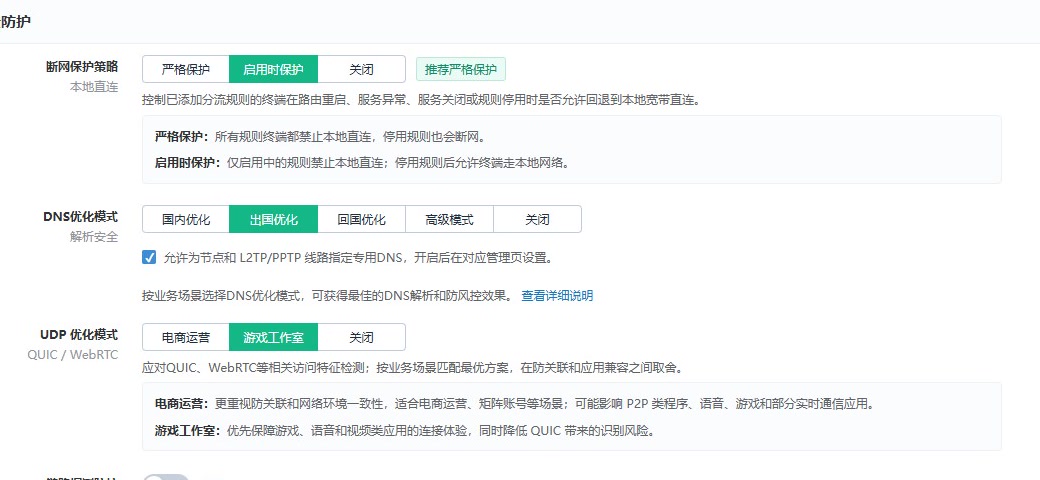
Automatic kill-switch on node failure reduces the risk of account correlation from local public network fallback and UDP/DNS leaks.

  • Strict kill-switch protection
  • DNS passthrough and leak prevention
  • UDP leak prevention optimized for business scenarios
SoloIP V7 kill-switch, DNS, and UDP protection settings

Stay in control from dozens to thousands of devices

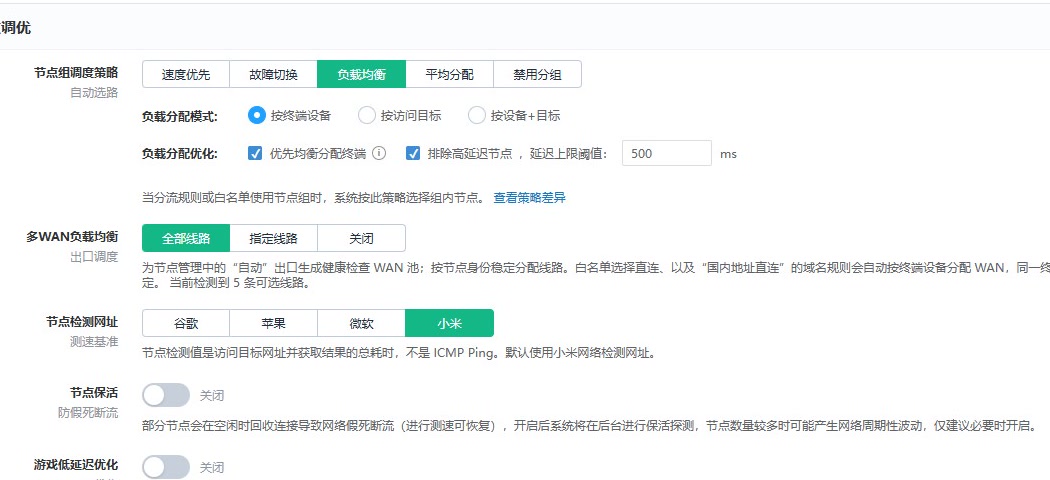
As devices, nodes, and lines grow, you can still configure uniformly, batch-adjust, and monitor status clearly at thousand-device scale.

  • Built for thousand-device studio scale
  • Node groups and multi-WAN auto load balancing
  • Batch management with optional OpenAPI access
SoloIP V7 node group scheduling and multi-WAN load balancing

Built for long-running studios

For studios that need continuous operation, full network control, and ongoing updates.

SoloIP

Studio Edition

For studios, teams, and power users who need full network control, automation, and continuous updates.

  • Unlimited devices
  • Full features
  • Continuous updates
300CNY / year
  • DNS leak prevention
  • Strict kill-switch protection
  • L2TP/PPTP support
  • Multi-WAN load balancing
  • UDP leak prevention
  • LAN isolation
  • Multi-node load balancing
  • Node purity detection

SK5-V2 Basic and Pro perpetual licenses remain available with fixed feature sets and no new features.View full feature comparison

From SK5 to SoloIP, always evolving

The name has changed, but our long-term commitment to studio networks has not.

  1. The beginning

    SK5 V1

    Built from real studio requirements, SK5 began with a clear goal: give every device its own network route.

  2. Architecture upgrade

    SK5 V2

    We rebuilt the interface and core capabilities for easier daily operations and reliable long-term use.

  3. Capability evolution

    SoloIP

    SoloIP builds on SK5 with a broader feature set designed to protect the network identity of every device.

View all release notes

Download firmware and get started

Upgrade with the official firmware for your device, activate the license in the plugin market, and install SoloIP to start your trial.

Firmware differs by iKuai version, CPU architecture, and hardware router model. The download page groups files and installation steps by device type.

Go to downloads

Any question, talk to us directly.

Contact us for installation help or product questions.

WeChat QR code
Scan with WeChat
WeChat
diyvcn99
Telegram
Telegram group